Introduction
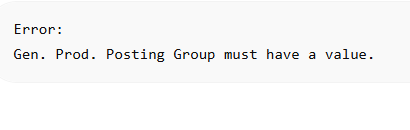
Many Microsoft Dynamics NAV 2009 users encounter the error:
Gen. Prod. Posting Group must have a value.
This error usually occurs during posting of Purchase Orders, Purchase Invoices, Warehouse transactions, or other inventory-related documents.
The system prevents posting because it cannot determine the appropriate General Ledger posting setup required for the transaction.
Understanding the Error
In Microsoft Dynamics NAV 2009, the General Product Posting Group is a key component of the posting setup.
It works together with:
- Gen. Bus. Posting Group
- Inventory Posting Group
- VAT Posting Setup
to determine which General Ledger accounts will be affected during posting.
When the Gen. Prod. Posting Group is missing, NAV cannot continue processing the transaction.
Common Causes
The error is commonly caused by:
- Missing Gen. Prod. Posting Group on Item Card
- Missing Gen. Prod. Posting Group on Purchase Line
- Incorrect posting setup
- Imported records with incomplete fields
- Legacy transactions created before setup changes
Solution 1 – Check Purchase Lines
Open the affected Purchase Order.
Review the Purchase Lines and verify:
- Gen. Prod. Posting Group
- Gen. Bus. Posting Group
- Inventory Posting Group
Ensure all required fields contain valid values.
Solution 2 – Review Item Card
Navigate to:
Inventory → Item Card
Open the affected item.
Verify that:
- Gen. Prod. Posting Group is populated.
- Inventory Posting Group is populated.
Save changes and repost.
Solution 3 – Use the Correct Posting Group
In many service-related transactions, assigning:
SERVICES
to the Gen. Prod. Posting Group resolves the issue.
Always confirm with Accounting before making changes to posting groups.
Solution 4 – Verify Posting Setup
Navigate to:
Administration → Application Setup → Financial Management → Posting Groups
Verify that all required combinations of:
- Gen. Bus. Posting Group
- Gen. Prod. Posting Group
have corresponding General Ledger account mappings.
Best Practices
To avoid future posting errors:
- Maintain complete Item Card setup.
- Review posting groups during item creation.
- Periodically audit posting setup.
- Validate imported transactions before posting.
Conclusion
The “Gen. Prod. Posting Group Must Have a Value” error is typically caused by incomplete posting configuration or missing item setup information.
By reviewing Purchase Lines, Item Cards, and Posting Setup configuration, NAV administrators can quickly restore normal posting operations and prevent future interruptions.
Need Help with Microsoft Dynamics NAV 2009?
APPAAPAP Solutions provides practical support for Microsoft Dynamics NAV 2009, warehouse operations, inventory control, Power Query automation, and Excel reporting solutions.
If you are experiencing NAV posting errors, inventory issues, or operational challenges, feel free to contact us for assistance.
Visit our Contact APPAAPAP page to get in touch.
Related Articles
- How to Fix “No G/L Entry Within Filter” Error in Microsoft Dynamics NAV 2009

